This guide will help you workout the correct write offset to use with Exact Audio Copy when burning CDs.
Load up Exact Audio Copy and Click “EAC” in the top left corner and select the “Drive Options“.
Navigate to the “Writer” tab.
Make sure the “Write samples offset” is set to 0 and then insert a blank CD into the drive and click the “Create Offset Test CD“.

When the CD is finished click on the “Offset / Speed” tab from the Drive Options menu. If you used AccurateRip when setting up Exact Audio Copy the window should look like the screenshot below.

Next you will need to uncheck “Use AccurateRip with this drive” so you can run the test. This will unlock the options in the top of the window. Now it should look like the screenshot below.

When everything is set click on “Detect read sample offset correction…” and the test will start.
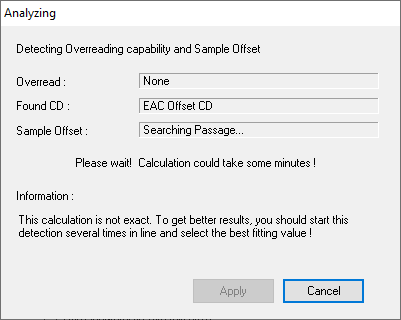
Exact Audio Copy will then display the results and you should see a window like the screenshot below.

The “Sample Offset” result is the combined read/write sample offset correction value.
To get the “Write samples offset” use the following formula:
combined read/write sample offset correction (minus) read sample offset correction.
For example:
The result returned above is 0. This is the combined read/write sample offset correction.
The read sample offset correction is +6 (determined by AccurateRip upon initial setup of EAC).
This means the calculation would be: 0-6 = -6 – This would mean the “Write samples offset” is -6.
These numbers will vary depending on the optical drive you have but the calculation is still the same.
Now go to the “Writer” tab and enter the correct value into “Write samples offset” as shown below.

NOTE: Make sure once you have finished that you go back to the “Offset / Speed” tab and check the “Use AccurateRip with this drive” in case it is still unchecked.
With the correct write samples offset configured you can burn another offset test CD which can be used in the future to detect the read sample offset in case AccurateRip can’t detect it.